 Ahablo
Claude Usage Limits: 5-Hour Session, Weekly Cap, Fixes
Paid Claude plans have a 5-hour session limit and weekly limits. Check them in Settings > Usage. When you hit one, wait for the reset, upgrade, or turn on usage credits.
Contents
Why did Claude stop? Two different limits
Claude has two limits that work differently. Mixing them up causes most of the confusion.
- Usage limits control how much you can use Claude over a period of time. Anthropic calls it a “conversation budget.”
- Length limits control how long a single conversation can get. They relate to the context window, which is how much Claude can work with in one chat.
Usage limits are what stop you mid-task, so most of this guide is about them. Length limits get their own short section near the end.
How do the 5-hour and weekly limits work?
According to Anthropic’s help article, paid plans have two types of usage limits. A session limit resets every five hours, and weekly limits reset once a week.
The 5-hour session limit. The clock starts when you send your first message. Your limit resets in full five hours later. If you hit it before then, you can use Claude again once it resets.
The weekly limits. They apply across all models, and some plans also have a separate weekly limit for Fable models. Weekly limits reset at a fixed time each week, assigned to your account. Your reset day and time stay the same no matter when you start using Claude or when your subscription began. You get your full weekly allowance each cycle. Your day and time are specific to your account, so look them up in Settings.
Everything counts together. Your usage across claude.ai, Claude Code and Claude Desktop counts toward the same limit. A long Claude Code session can eat the allowance you wanted for chat.
What burns usage faster. Anthropic lists the length and complexity of your conversations, the features you use, which model you’re chatting with, and the effort level you selected.
How many messages do I get?
Anthropic doesn’t publish a fixed number. The help article says the number of messages you can send varies with message length (including attached files), the length of your current conversation, and the model or feature you use.
Anthropic may also adjust usage limits at its discretion to manage capacity and ensure fair access. It may use weekly and monthly caps, or limits by model and feature. Treat any “you get X messages” figure you see elsewhere as unofficial. Anthropic’s usage-limit article doesn’t give a figure for the Free plan either.
What Anthropic does say about plan sizes:
- Pro gives more usage per session than the Free plan, with a five-hour limit and a weekly limit across all models. It costs $20 per month in the US, with local-currency pricing where supported. Prices vary by region, so check claude.ai/upgrade or your app store for your own.
- Max gives five times the Pro plan’s usage every five hours and every week. It has a five-hour limit, a weekly limit across all models, and a separate weekly limit for Fable. It’s $100 per month (web subscription; mobile pricing may differ by app platform).
- Ultra is a step up with more usage. Verified Ultra accounts don’t have a five-hour limit. This guide doesn’t cover Ultra pricing.
Prices and plans can change at Anthropic’s discretion.
Where do I check my Claude usage?
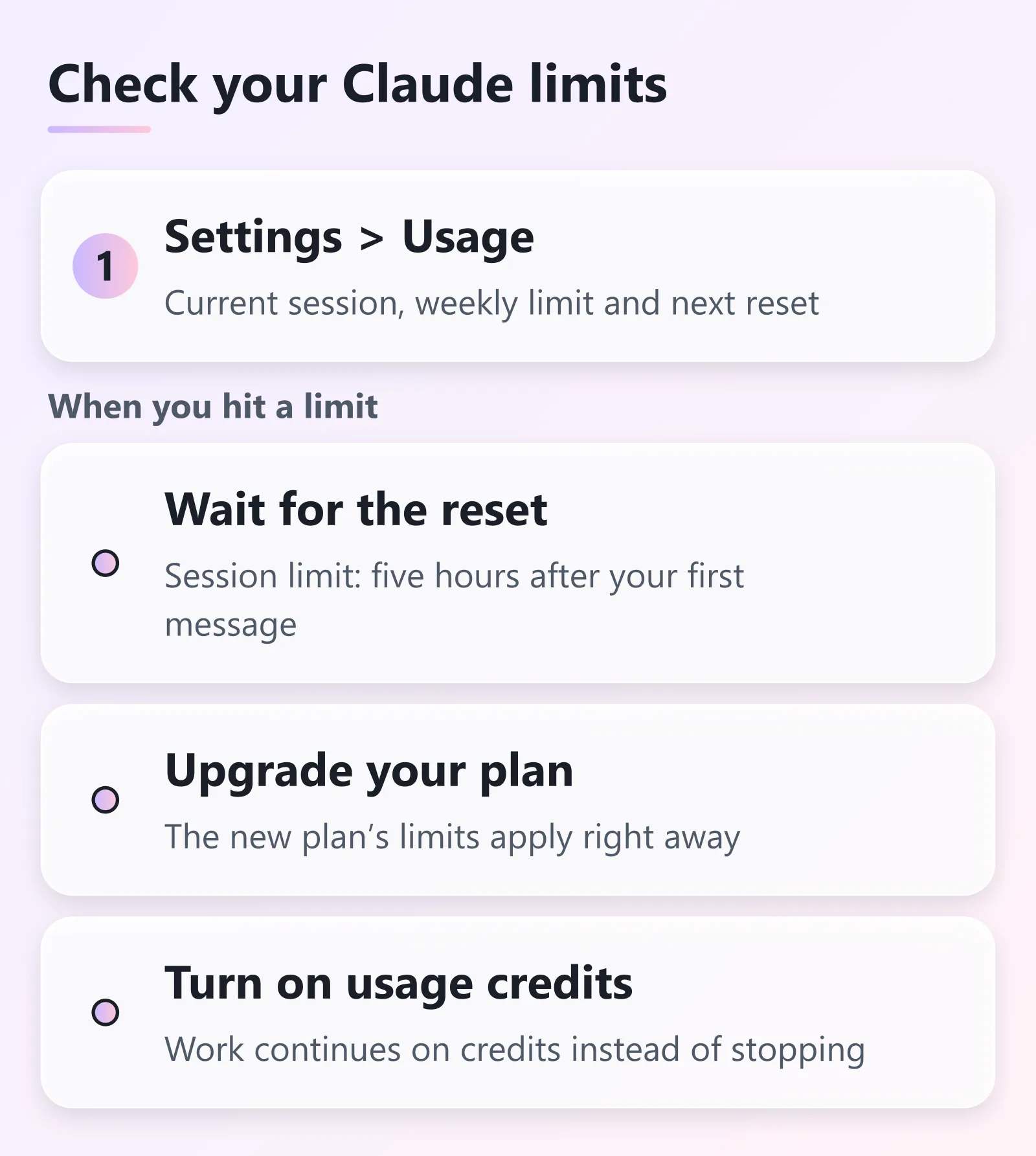
Open Settings > Usage. Anthropic’s articles say you can see:
- how much you’ve used and the time remaining under Current session
- your next weekly reset time
The usage best-practices article also describes progress bars there for session and weekly usage.
What do I do when I hit a limit?
Anthropic gives three routes:
- Wait for the reset. For the session limit, that’s five hours after your first message in that window. For the weekly limit, it’s your account’s fixed reset time.
- Upgrade your plan. If you upgrade, the new plan’s limits apply right away.
- Turn on usage credits. With usage credits enabled, your work continues on credits instead of stopping. Pro subscribers can enable them to keep working beyond the plan’s included usage. Anthropic has a separate article, “Manage usage credits for paid Claude plans.” Read it for details and pricing before you flip the switch.
Can I reset my Claude limit early?
Sometimes. Now and then Anthropic gives eligible plans a limit reset. Using it puts your five-hour session limit or weekly limit back to full right away. From the article:
- You don’t have to wait until you hit a limit to use it. Once you use it, you can’t undo it.
- Your weekly limits still reset on their usual day and time.
- To use one, go to Settings > Usage on the web, Claude Desktop or the mobile app. Click “Reset for free” in the Limit resets section and confirm. The same button appears on the message you see when you reach a limit.
- The button isn’t currently available in Claude Code in a terminal or IDE. Use a browser, Desktop or mobile instead. The restored usage still applies in Claude Code because limits are shared across your account.
- An unused reset expires on the date shown. If you downgrade or cancel before using it, it’s gone.
- A reset doesn’t refund extra usage you were already billed for.
How can I make my Claude usage last longer?
From Anthropic’s help articles:
- Start a new conversation instead of continuing a very long one. Longer conversations that trigger automatic context management use more of your limit.
- Turn thinking off when you don’t need the extra reasoning, or choose a lower effort level for routine tasks.
- Turn off connected apps and web search when you don’t need them. Tools and connectors are token-intensive.
- Put reusable material in a project. Anthropic says content in projects is cached and counts less against your limits when reused.
Moving over from ChatGPT? See Moving From ChatGPT to Claude. For plans and other features, the Claude guide covers them in one place.
What about length limits?
If a single chat gets too long, that’s the length limit. On paid plans the newest models support up to a 1M-token context window, others 500K or 200K. For users with code execution enabled, Claude automatically summarizes earlier messages as a conversation nears the limit. Your full chat history is preserved. The fix for a length limit is to start a new conversation or use projects.
ChatGPT has a similar “chat is full” notice. Here’s how that one works: ChatGPT says “Context window full”.
About this guide
Written by Aha from Anthropic’s Claude Help Center articles, checked 2026-11-16. The Pro figure above is the US price, and the Max figure is the web-subscription price, both as listed by Anthropic.
Sources, checked 2026-11-16:
- How do usage and length limits work?
- What is a limit reset?
- What is the Pro plan?
- What is the Max plan?
- Usage limit best practices
Last updated here: 2026-11-17.
Related posts
Sources and checks
- Last checked
- Nov 16, 2026
- Updated
- Nov 17, 2026
- Checked by
- Aha
- How we checked
- Checked against Anthropic's official Claude Help Center articles on 2026-11-16. Menu names and behavior come from those articles.
- Sources